Simplify Your Accounting with CapiPlan’s
Purchase Return Module
Efficiently managing purchases is critical for any business, and handling purchase returns accurately is equally important. A delayed or incorrect purchase return can disrupt your accounts, create confusion in supplier balances, and affect your financial reporting. This is where CapiPlan’s Purchase Return module comes in. Designed to streamline the process, it ensures your business keeps track of every purchase and return, helping you maintain accurate accounting records effortlessly.
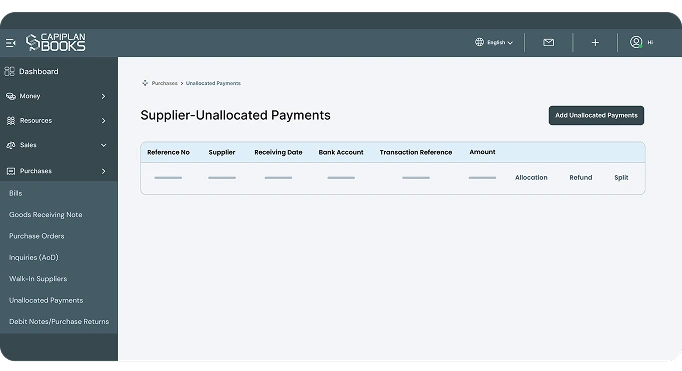
What is Purchase Return?
Before diving into the module, it’s essential to understand what is purchase return. A purchase return occurs when goods or services previously purchased from a supplier are returned due to reasons such as defects, excess quantity, or wrong delivery. Handling these returns properly ensures your business accounts reflect the correct payable amounts and prevents errors in inventory and financial reports.
A purchase return can involve:
Issuing a debit note to the supplier.
Updating purchase return entries in the accounting system.
Why Purchase Returns Are Important
Purchase returns are more than just sending goods back. They have a direct impact on your accounting and inventory management. Some key reasons why purchase returns matter include:
Accurate Accounts
Returns affect your accounts payable. Proper handling ensures your liabilities reflect actual obligations.
Inventory Management
Returning damaged or excess goods helps keep your stock records correct.
Supplier Relationships
Proper documentation of returns, like issuing a purchase return debit note, ensures transparency and smooth supplier interactions.
Financial Reporting
Adjustments through journal entries for purchase returns maintain the accuracy of your financial statements.
How CapiPlan Simplifies Purchase Returns
CapiPlan’s Purchase Return module is designed to simplify every step of the return process. Here’s how it works:
By automating these processes,
CapiPlan ensures businesses never miss a return entry and can maintain a reliable record of all transactions.
Easy Entry of Purchase Returns
Record all details of returned items, including the supplier, purchase order, and reason for return. CapiPlan automatically generates purchase return debit notes with a reference number, generation date, supplier name, and return amount, while updating inventory and accounts payable in real time.
Seamless Journal Entries
When a purchase return is recorded, the system automatically creates a journal entry for purchase return, ensuring your financial statements remain accurate.
Tracking and Reports
Get a clear view of all purchase returns, including pending returns, completed returns, and their impact on your financials. The module also supports generating reports for internal audits or supplier reconciliation.
Key Features
of the CapiPlan’s Purchase Return Module
CapiPlan’s module is packed with features that make purchase return management efficient and error-free:
1. User-Friendly Interface
- Add, edit, or delete purchase return entries with a simple interface.
2. Debit Note Management
- Generate and view debit notes directly from the system.
3. Supplier Ledger Updates
- Every purchase return updates supplier ledgers automatically.
4. Multi-Currency Support
- If you deal with international suppliers, the module handles multiple currencies seamlessly.
5. Search and Filter
- Easily find purchase return entries by debit note number, supplier, or date.
6. Integrated with Other Modules
- Works in harmony with purchases, inventory, and accounting modules for smooth operations.
Understanding Purchase Return Entries
In accounting, every purchase return needs to be recorded correctly. A purchase return entry is created when goods are returned, reflecting the decrease in your liability to the supplier. This entry helps maintain the correct balance in accounts payable and ensures your inventory records are updated.
For example, if your business purchased goods worth AED 5,000 and returned items worth AED 1,000, a journal entry for purchase return will adjust the payable amount to AED 4,000. This ensures your books are always accurate and reconciled with supplier statements.
Why Businesses Prefer CapiPlan for Purchase Return
Handling purchase returns manually can be time-consuming and error-prone. CapiPlan’s Purchase Return module makes this task simple, efficient, and accurate.
Businesses benefit from:
- Faster processing of returns
- Fewer accounting errors
- Clear documentation for audits
- Smooth supplier communication
Whether you are a small business or a large enterprise, having a robust purchase return system is critical for financial accuracy and operational efficiency.
FAQ's
1. What is a purchase return?
A purchase return is when goods previously bought from a supplier are sent back due to defects, excess, or wrong delivery.
2. What is a purchase return debit note?
It’s a document issued to the supplier indicating the value of goods returned and the amount they owe you.
3. How does CapiPlan handle purchase return entries?
CapiPlan updates inventory, generates debit notes, and posts journal entries for accurate accounting.
Automate Your Purchase Returns with CapiPlan Now!
Purchase returns are an essential part of business operations. Understanding what a purchase return is and managing it correctly helps keep accounts accurate, inventory well maintained, and supplier relationships intact. CapiPlan’s Purchase Return module simplifies the entire process, from creating purchase return entries to issuing debit notes.
With CapiPlan, businesses can manage returns confidently, reduce errors, and focus on growth instead of paperwork. Automate your purchase return process today and experience a seamless accounting workflow that saves time, ensures accuracy, and strengthens your financial management.