Simplify Financial Management with CapiPlan
Chart of Accounts
Managing a business’s finances can be overwhelming. From tracking assets to monitoring
liabilities and understanding profit and loss, every financial transaction needs to be recorded
accurately. This is where a chart of accounts becomes essential. It organizes your business’s
financial data into categories, making reporting, budgeting, and auditing much simpler. If you
are a small business or a growing enterprise, having a well-structured chart of accounts ensures
clarity, transparency, and efficiency in your financial management.
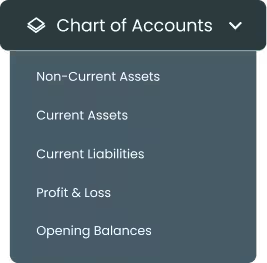
CapiPlan’s chart of accounts solution is designed to help businesses manage their finances seamlessly.
Assets
Liabilities
Profit & Loss
Opening Balances
Our software offers a comprehensive view of your company’s financial health.
Optimize Your Business with CapiPlan Chart of Accounts
CapiPlan’s chart of accounts software simplifies complex financial data. It allows businesses to categorize accounts systematically, ensuring accurate tracking of every transaction. From recording assets and liabilities to managing expenses and revenue, our solution provides the tools you need for effective financial control.
With features like predefined account heads, flexible customization, and multi-currency support, CapiPlan helps businesses reduce errors, save time, and improve decision-making. Whether you’re asking “what is chart of accounts?” or looking for a chart of accounts sample, CapiPlan makes the process intuitive and efficient.
Modules of Chart of Accounts
CapiPlan’s chart of accounts is divided into five core modules. Each module plays a key role in maintaining a complete and accurate financial record for your business.
1. Non-Current Assets
Non-current assets are long-term resources your business owns and uses to generate income.
These include property, equipment, and technology assets.
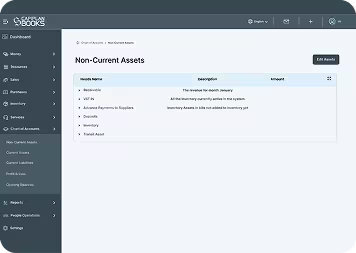
CapiPlan Non-Current Assets Module includes:
- Land & Building:
Tracks all property and infrastructure owned by the business. - Machinery & Equipment:
Records production or operational machinery. - Furniture & Fixtures:
Monitors office furniture and fixtures. - Motor Vehicles:
Maintains records for all company-owned vehicles - Laptops & Computers:
Tracks all electronic devices and software. - Tangible Assets:
Other physical assets with measurable value.
Your content goes here. Edit or remove this text inline or in the module Content settings. You can also style every aspect of this content in the module Design settings and even apply custom CSS to this text in the module Advanced settings.
2. Current Assets
Current assets are short-term resources that can be converted into cash within a year. Proper tracking is crucial for liquidity management.
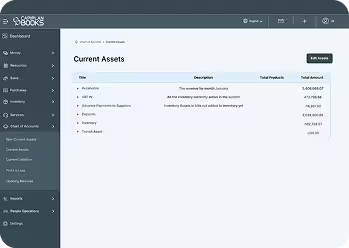
CapiPlan Current Assets Module includes:
- Receivables:
Monitors money owed by customers.
VAT In: Tracks recoverable VAT payments. - Advance Payments to Suppliers:
Records prepayments to vendors. - Cash & Cash Equivalents: Tracks cash on hand and in banks.
- Deposits:
Maintains records of security or rental deposits. - Inventory:
Tracks all stock items currently available in the system. - Transit Assets & Inventory:
Records inventory that is present in bills but not yet received.
By organizing current assets, businesses can maintain healthy cash flow and avoid shortages.
3. Current Liabilities
Current liabilities represent obligations that the business must settle within a year. Proper management ensures timely payments and financial stability.
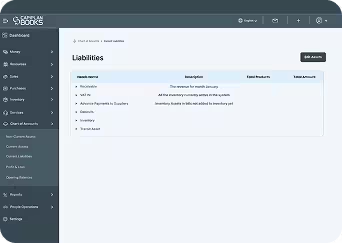
The CapiPlan Current Liabilities module includes the following:
- Accounts Payable:
Tracks payments due to suppliers.
Managing liabilities effectively prevents late payments, maintains vendor trust, and helps businesses avoid penalties.
4. Profit and Loss
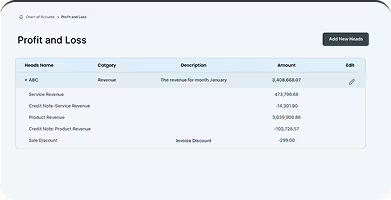
The profit and loss module tracks revenues, expenses, and net profit, giving a clear picture of business performance.
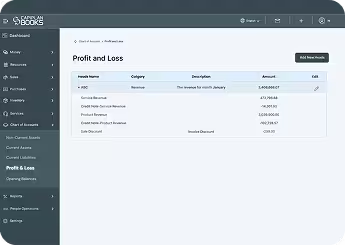
CapiPlan Profit and Loss Module includes:
- Revenue:
Records all income from products or services. - Cost of Goods Sold (COGS):
Tracks costs directly related to product production. - Salaries and Wages:
Monitors employee compensation. - Operating Expenses:
Tracks cash on hand and in banks.
Administrative and Financial - Expenses:
Tracks office and finance-related costs. - Other Expenses:
Records miscellaneous or other expenses.
This module enables businesses to analyze profitability, control costs, and plan for growth.
5. Opening Balances
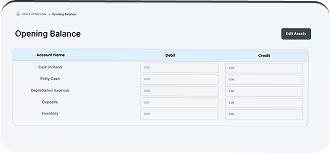
Opening balances represent the starting point of your accounts when implementing accounting software. They ensure that all historical financial data is accurately reflected.
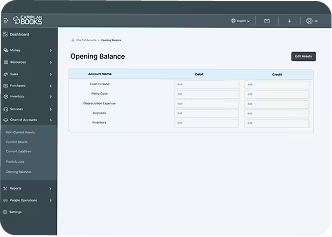
CapiPlan Opening Balances Module includes:
- Bank Accounts:
Tracks balances across different currencies. - Expenses & Income Accounts:
Records opening balances for all heads, including salaries, rent, depreciation, VAT & others. - Customer and Supplier Balances:
Maintains accurate opening amounts for receivables and payables. - Inventory & Transit Assets:
Ensures starting stock values are correctly accounted for.
With this module, businesses can start fresh in CapiPlan while maintaining full financial accuracy.
Why Businesses Need CapiPlan Chart of Accounts
A well-organized chart of accounts for a business firm is essential for smooth financial operations.
Simplified Financial Management
All accounts are categorized and easy to track.
Time-Saving Automation
Automates recurring entries and calculations.
Comprehensive Reporting
Generates detailed financial statements quickly.
Compliance Ready
Ensures all records are audit-ready and compliant with regulations.
Enhanced Accuracy
Minimizes human errors in accounting entries.
Scalable Solution
Suitable for small businesses and large enterprises alike.
Whether you are looking for a basic chart of accounts for a small business or a complex multidepartment setup, CapiPlan provides flexibility and efficiency in managing finances.
FAQ’s
1. What is a chart of accounts?
A chart of accounts is a structured list of all accounts a business uses to record financial transactions. It categorizes assets, liabilities, equity, revenues, and expenses.
2. How do I create a chart of accounts for my business?
CapiPlan provides predefined modules, making it easy to customize for your business. If users want to create their own accounts, they can start by identifying major account categories—such as assets, liabilities, and expenses—and then add account names under the respective categories.
3. Can small businesses benefit from a chart of accounts?
Absolutely. Even small businesses need organized financial tracking. A basic chart of accounts helps maintain clarity, avoid mistakes, and plan for growth efficiently.
Gain Full Financial Control with CapiPlan Chart of Accounts Today
Managing finances doesn’t have to be complicated. With CapiPlan chart of accounts software, businesses can organize all accounts in one place, track assets and liabilities, manage revenue and expenses, and start with accurate opening balances.
Whether you are a growing company in Dubai or a small business in the UAE, CapiPlan provides the tools to simplify accounting, improve reporting, and make smarter financial decisions.
Take the first step toward smarter financial management today.
Explore CapiPlan Chart of Accounts and Streamline your business like never before.