Transaction Register Module
Track Every Business Transaction with CapiPlan
The CapiPlan Transaction Register Module gives businesses a complete view of all financial
entries in one place. Every debit and credit is recorded, organized, and easy to review.
From simple payments to complex journal entries, everything stays clear and controlled.
Streamline Your Business with CapiPlan Transaction Register Module
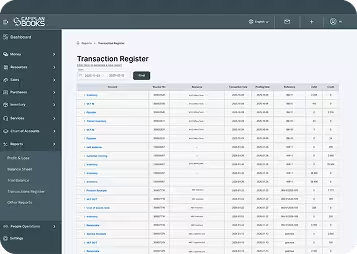
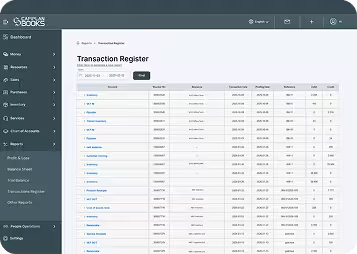
The transaction register module in CapiPlan is designed to bring clarity to business accounts. It acts as a central record where all financial activities are listed in chronological order. Each transaction shows complete details such as account name, voucher number, resource, transaction date, posting date, debit, and credit values.
Businesses can easily check transaction register data without digging through multiple reports. Whether it is inventory movement, VAT entries, customer receipts, supplier payments, salaries, or loans, everything appears in one structured report.
The module supports filters for:
- Posting date
- Transaction date
- Category
- Resource
This makes it easy to narrow down specific entries. The all-transaction report updates instantly once generated, saving time and reducing manual effort.
For businesses in the UAE, where VAT compliance and audit readiness matter, this module helps keep records accurate and transparent.
What Is a Transaction Register?
A transaction register is a detailed record of all financial transactions recorded in an accounting system. It works like a digital transaction register book, listing entries in sequence with complete financial impact.
Each record usually includes:
- Account affected
- Debit or credit amount
- Transaction date
- Reference or voucher number
- Linked customer or supplier
In traditional accounting, this was maintained in a physical register book. With CapiPlan, the same concept is transformed into a powerful digital tool that is faster, more accurate, and easier to manage.
Key Feature
of CapiPlan Transaction Register Module
1. Complete Transaction Visibility
- Every transaction appears in a single report. Sales invoices, purchase bills, VAT entries, journal vouchers, payroll postings, and cash movements are all visible at the transactional level. This gives a full financial picture without switching screens.
3. Clear DebiDebit and Credit Clarity
- Each entry clearly shows debit and credit amounts. This helps businesses understand cash flow, balances, and account movement at a glance.
4. Transaction Register Export Option
- Reports can be exported is csv and also used as a transaction register printable view. This is useful for audits, internal reviews, or sharing with accountants and auditors.
5. Real-Time Report Generation
- Reports are generated instantly. There is no waiting time or manual compilation. The latest data is always available when needed.
6. Accurate Posting and Reference Tracking
- Each transaction includes posting dates and references. This helps in tracing entries back to original invoices, bills, or journal vouchers.
7. Supports Multiple Transaction Types
The module handles:
- Inventory and cost of goods sold
- VAT input and output
- Receivables and payables
- Advance payments
- Bank and cash entries
- Salary and expense postings
- Loans and depreciation & Others
Everything stays organized under one system.
Why Businesses Choose CapiPlan for Transaction Register
Designed for UAE Businesses
CapiPlan is built with UAE accounting needs in focus. VAT tracking, structured reporting, and audit readiness are core strengths.
Reduces Manual Errors
Automated posting and clear debit-credit separation reduce mistakes that often occur in manual registers.
Supports Business Growth
As transaction volume grows, the module scales easily. Thousands of entries remain organised and searchable.
Simple and User-Friendly
The interface is clean and easy to use. Even non-accounting staff can review the transaction register book without confusion.
Saves Time
Instead of checking multiple ledgers, businesses can rely on one detailed report. This improves efficiency across finance teams.
Reliable Data for Audits and Reviews
CapiPlan ensures all your transaction data is accurate and up-to-date. This makes audits, internal reviews, and financial checks simple and reliable.
FAQ's
1. What is the use of a transaction register in accounting?
A transaction register records all financial transactions in detail. It helps businesses track debits and credits, verify postings, and maintain accurate accounts.
2. Can I download the transaction register inCapiPlan?
Yes. The transaction register can be downloaded for audits, internal reviews, or sharing and it’s easy to use in csv format.
3. How often should businesses check the transaction register?
It is recommended to check transaction register entries regularly. Daily or weekly reviews help catch errors early and keep accounts clean.
Get Complete Visibility into Your Transactions with CapiPlan
The CapiPlan Transaction Register Module gives businesses full control over their financial data. Every transaction is visible, organized, and easy to review. From daily operations to audit preparation, this module keeps accounts accurate and stress-free.
Choose CapiPlan to replace manual registers with a smart, reliable, and scalable solution. Keep every transaction recorded, every number verified, and every report ready when needed.