Effortless Payment Management with CapiPlan
Unallocated Payments
Managing payments in any business can be complex, especially when dealing with multiple suppliers, currencies, and payment methods. Unallocated payments often pile up, creating confusion in tracking purchases and reconciling accounts. CapiPlan’s Unallocated Payments Module is designed to simplify this process, helping businesses save time, reduce errors, and maintain complete control over financial transactions.
With CapiPlan, handling unallocated payments becomes easier than ever. The module allows businesses to track, manage, and allocate payments efficiently, ensuring smooth operations in procurement and financial management.
Streamline Your Business with CapiPlan Unallocated Payments
Managing walk-in suppliers can be challenging without the right tools.
CapiPlan’s Unallocated Payments feature is a powerful tool for businesses looking to organize their financial processes. Whether you are dealing with advance payments, refunds, or supplier transactions, this module keeps everything in one place.
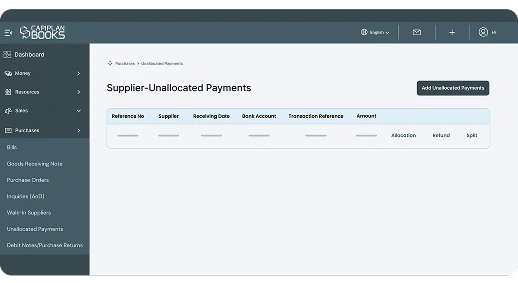
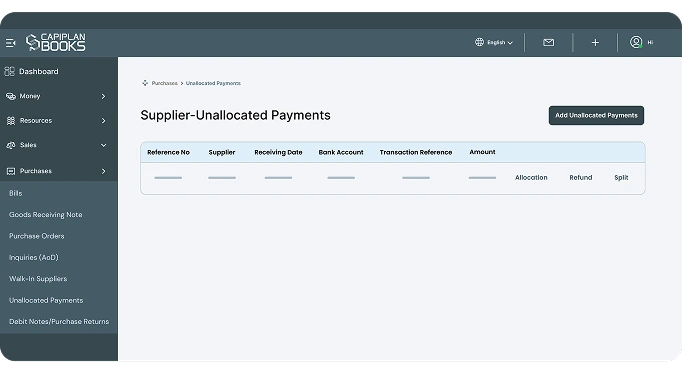
The system displays all unallocated payments in a structured table with key details such as Reference No, Supplier, Receiving Date, Bank Account, Transaction Reference, Amount, and Allocation. This clear layout allows finance teams to review and track unallocated transactions at a glance.
By keeping everything centralized, the system helps you reduce errors and delays, making it easier to allocate payments to the correct purchases and supplier accounts.
With CapiPlan, adding, tracking, and managing payments is quick and easy. Businesses can keep accurate records and save time on manual work.
Key Features
CapiPlan Unallocated Payments
CapiPlan’s Unallocated Payments Module comes with features designed to improve efficiency and accuracy in financial management:
1. Comprehensive Payment Tracking
- Every unallocated payment is tracked with Payment Tracking Details, ensuring that nothing falls through the cracks.
2. Easy Allocation & Splitting
- Payments can be allocated or split across multiple purchases, enabling businesses to manage complex transactions without confusion.
- For example, a single payment can be split between multiple invoices or refunded amounts.
3. Multiple Currency Support
- The module supports payments in various currencies such as AED, CAD, USD, and more.
- This is essential for businesses dealing with international suppliers.
4. Quick Add Payments Feature
- Adding new unallocated payments is straightforward.
- Users simply enter the payment details, making the process fast and error-free.
5. Detailed Reports & Insights
- Finance teams can generate reports showing all unallocated payments, allocations, and refunds.
- This makes reconciliation and financial analysis seamless.
6. User-Friendly Interface
- The module is designed with simplicity in mind. Even teams with minimal accounting experience can manage unallocated payments effectively.
7. Integration with Purchases
- Unallocated payments are linked directly to purchases, ensuring that every payment can be matched accurately with the corresponding supplier transactions.
Why Businesses Need CapiPlan Unallocated Payments
Efficient payment management is critical for business success. Here’s why CapiPlan’s module is essential for modern businesses:
Eliminate Confusion
Unallocated payments often create discrepancies in accounts. With CapiPlan, every payment is logged, tracked, and easily allocated.
Save Time
Manual tracking of payments is time-consuming. The module automates much of the process, freeing your finance team to focus on strategic operations.
Enhance Accuracy
By providing a clear view of all payments and allocations, accounting becomes precise and reliable.
Improve Cash Flow Management
Knowing exactly which payments are unallocated helps businesses manage cash flow more efficiently.
Multi-Currency Transactions
For businesses dealing with international suppliers, the module handles multiple currencies, ensuring accurate allocation without manual conversion errors.
Support Growth
As your business grows, the number of payments and suppliers increases. CapiPlan scales with your business, ensuring you never lose control over financial transactions.
FAQ's
1. What are unallocated payments in CapiPlan?
Unallocated payments are supplier payments or refunds that have been received but not yet linked to a specific purchase, invoice, or supplier account. The module allows businesses to allocate these payments efficiently when the relevant information becomes available.
2. How does CapiPlan handle unallocated payments from multiple suppliers?
CapiPlan automatically organizes unallocated payments by supplier, making it easy to track and allocate each payment correctly. This ensures accuracy and saves time when reconciling accounts.
3. Can I split a payment across multiple purchases?
Yes, CapiPlan allows you to allocate or split payments. This is useful when a single payment covers multiple invoices or when part of a payment needs to be refunded. The module ensures every transaction is accurately tracked.
Simplify Your Payments with CapiPlan Today!
CapiPlan’s Unallocated Payments Module is more than just a tracking tool—it’s a complete solution for businesses looking to streamline their financial operations. By consolidating all unallocated payments in one place, the module helps businesses manage purchases, suppliers, and transactions efficiently.
With features like easy payment addition, allocation and splitting, multi-currency support, and detailed reporting, your finance team can work faster, smarter, and more accurately. The user-friendly interface ensures that everyone, from accountants to finance managers, can handle payments without stress or confusion.
CapiPlan empowers businesses to maintain accurate financial records, improve cash flow management, and scale operations without worrying about unallocated payments. Whether you are a small business or a large enterprise, this module is designed to keep your payments organized and your accounts up-to-date.